
આજની ઝડપી અને ટેકનોલોજીથી ચાલતી દુનિયામાં, ઇલેક્ટ્રોનિક ઉપકરણો આપણા રોજિંદા જીવનનો એક અભિન્ન ભાગ બની ગયા છે. સ્માર્ટફોન અને ટેબ્લેટથી લઈને લેપટોપ અને ગેમિંગ કન્સોલ સુધી, અમે કનેક્ટેડ રહેવા માટે આ ગેજેટ્સ પર આધાર રાખીએ છીએ, મનોરંજન, અને ઉત્પાદક. તેમ છતાં, એક સામાન્ય પડકાર જેનો ઘણા વપરાશકર્તાઓ સામનો કરે છે તે છે કે આ ઉપકરણોને કાર્યક્ષમ અને સુરક્ષિત રીતે કેવી રીતે પાવર કરવું. આ તે છે જ્યાં યુનિવર્સલ AC એડેપ્ટર રમતમાં આવે છે. આ વ્યાપક માર્ગદર્શિકામાં, અમે યુનિવર્સલ એસી એડેપ્ટરનો ઉપયોગ કરવાના ઇન્સ અને આઉટ્સનું અન્વેષણ કરીશું, તેના કાર્યોને સમજવાથી લઈને સામાન્ય સમસ્યાઓના નિવારણ સુધી બધું આવરી લે છે. આ લેખના અંત સુધીમાં, તમને એસી એડેપ્ટરનો અસરકારક અને સુરક્ષિત રીતે ઉપયોગ કેવી રીતે કરવો તેની સંપૂર્ણ સમજ હશે.
એસી એડેપ્ટરોની મૂળભૂત બાબતોને સમજવી
યુનિવર્સલ એસી એડેપ્ટરનો ઉપયોગ કરવાની વિશિષ્ટતાઓમાં ડાઇવિંગ કરતા પહેલા, એસી એડેપ્ટરો પાછળના મૂળભૂત ખ્યાલોને સમજવું જરૂરી છે. એસી એડેપ્ટર, પાવર સપ્લાય અથવા ચાર્જર તરીકે પણ ઓળખાય છે, એક ઉપકરણ છે જે વૈકલ્પિક પ્રવાહને રૂપાંતરિત કરે છે (એસી) દિવાલના આઉટલેટમાંથી સીધા પ્રવાહમાં (ડીસી) જેનો ઉપયોગ ઈલેક્ટ્રોનિક ઉપકરણોને પાવર કરવા માટે થઈ શકે છે. આ રૂપાંતરણ નિર્ણાયક છે કારણ કે મોટાભાગના ઇલેક્ટ્રોનિક ઉપકરણો ડીસી પાવર પર કાર્ય કરે છે, જ્યારે વોલ આઉટલેટ્સ દ્વારા પૂરી પાડવામાં આવતી વીજળી એસી સ્વરૂપમાં છે.
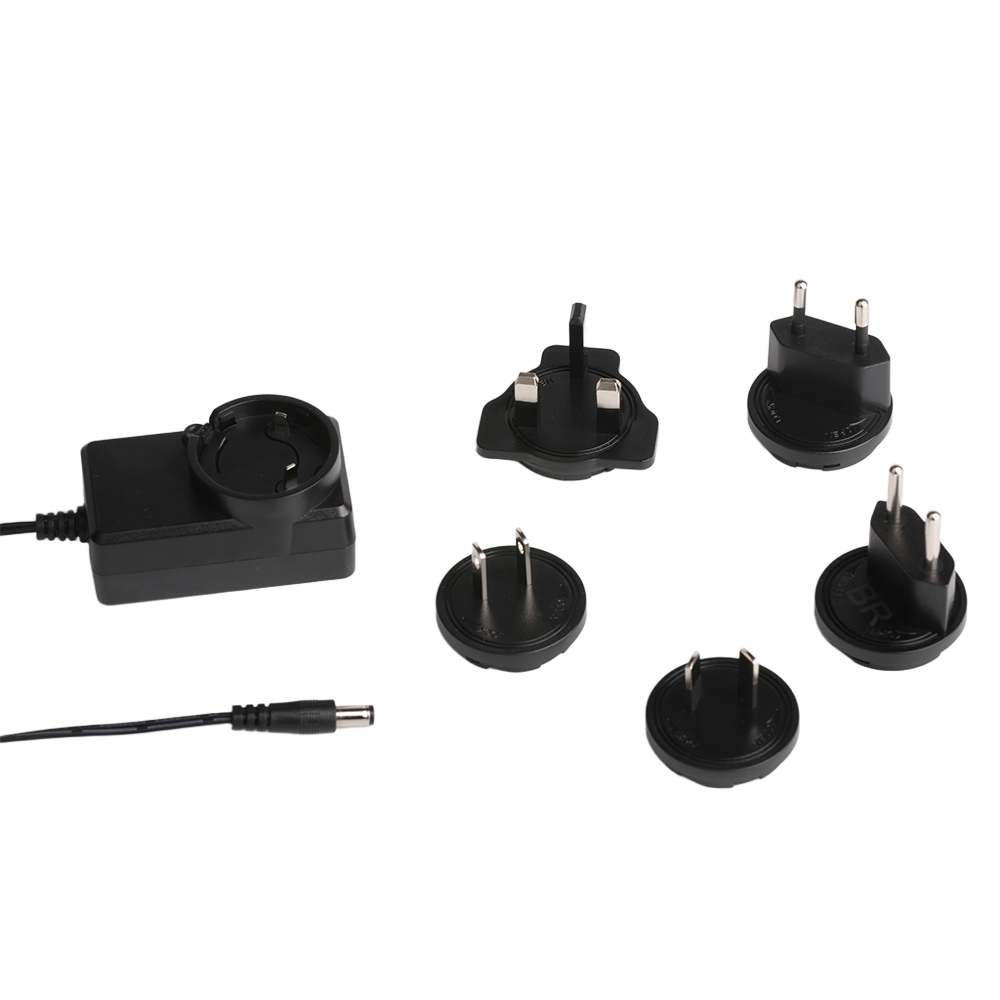
એસી એડેપ્ટરના મુખ્ય ઘટકો
- ઇનપુટ વોલ્ટેજ રેન્જ: ઇનપુટ વોલ્ટેજ શ્રેણી વોલ્ટેજની શ્રેણી સૂચવે છે જે એડેપ્ટર દિવાલના આઉટલેટમાંથી સ્વીકારી શકે છે. યુનિવર્સલ એસી એડેપ્ટરો સામાન્ય રીતે વિશાળ ઇનપુટ શ્રેણી ધરાવે છે, જેમ કે 100V થી 240V, તેમને વિવિધ વોલ્ટેજ ધોરણો સાથે વિવિધ દેશોમાં ઉપયોગ માટે યોગ્ય બનાવે છે.
- આઉટપુટ વોલ્ટેજ અને વર્તમાન: આઉટપુટ વોલ્ટેજ અને વર્તમાન એ જટિલ વિશિષ્ટતાઓ છે જે તમારા ઉપકરણ સાથે એડેપ્ટરની સુસંગતતા નક્કી કરે છે. ઉદાહરણ તરીકે, લેપટોપને જરૂર પડી શકે છે 12V થી 240V એડેપ્ટર યોગ્ય રીતે કાર્ય કરવા માટે ચોક્કસ વર્તમાન રેટિંગ સાથે.
- પાવર કોર્ડ: આ એસી એડેપ્ટર પાવર કોર્ડ એડેપ્ટર અને દિવાલ આઉટલેટ વચ્ચેનું ભૌતિક જોડાણ છે. એડેપ્ટર કાર્યક્ષમ રીતે કાર્ય કરવા માટે પાવર કોર્ડ સારી સ્થિતિમાં છે અને યોગ્ય રીતે પ્લગ ઇન છે તેની ખાતરી કરવી જરૂરી છે..
એસી એડેપ્ટરનો ઉપયોગ કેવી રીતે કરવો: પગલું દ્વારા પગલું માર્ગદર્શિકા
AC એડેપ્ટરનો ઉપયોગ કરવો સીધો લાગે છે, પરંતુ સલામત અને કાર્યક્ષમ કામગીરી સુનિશ્ચિત કરવા માટે ઘણા પગલાં અને વિચારણાઓ છે. તમારા યુનિવર્સલ AC એડેપ્ટરનો સૌથી વધુ લાભ મેળવવા માટે આ પગલાં અનુસરો:
પગલું 1: ઉપકરણની પાવર આવશ્યકતાઓને ઓળખો
કોઈપણ AC એડેપ્ટરને તમારા ઉપકરણ સાથે કનેક્ટ કરતા પહેલા, ઉપકરણની ચોક્કસ પાવર જરૂરિયાતોને સમજવી મહત્વપૂર્ણ છે. આ માહિતી સામાન્ય રીતે ઉપકરણના વપરાશકર્તા માર્ગદર્શિકામાં અથવા ઉપકરણ પર જ મળી શકે છે. જરૂરી ઇનપુટ વોલ્ટેજ માટે જુઓ (દા.ત., 12વી) અને વર્તમાન (દા.ત., 2એ). તમારા ઉપકરણને નુકસાન ન થાય તે માટે આ વિશિષ્ટતાઓને એડેપ્ટરના આઉટપુટ સાથે મેચ કરવી જરૂરી છે.
પગલું 2: જમણું AC એડેપ્ટર પસંદ કરો
યુનિવર્સલ એસી એડેપ્ટર્સ બહુમુખી અને ઉપકરણોની વિશાળ શ્રેણી સાથે સુસંગત બનવા માટે રચાયેલ છે. તેમ છતાં, એડેપ્ટર પસંદ કરવાનું હજુ પણ મહત્વનું છે જે તમારા ઉપકરણની ચોક્કસ પાવર જરૂરિયાતોને પૂર્ણ કરે છે. AC એડેપ્ટર પસંદ કરતી વખતે, નીચેના પર ખૂબ ધ્યાન આપો:
- વોલ્ટેજ સુસંગતતા: ખાતરી કરો કે એડેપ્ટરનું આઉટપુટ વોલ્ટેજ ઉપકરણના જરૂરી વોલ્ટેજ સાથે મેળ ખાય છે. ઉદાહરણ તરીકે, જો તમારા ઉપકરણને 6V એડેપ્ટરની જરૂર હોય, ઉચ્ચ અથવા નીચલા વોલ્ટેજ સાથે એડેપ્ટરનો ઉપયોગ કરશો નહીં.
- વર્તમાન ક્ષમતા: એડેપ્ટરનું આઉટપુટ વર્તમાન ઉપકરણના જરૂરી વર્તમાન કરતા બરાબર અથવા વધારે હોવું જોઈએ. Using an adapter with insufficient current capacity can lead to poor performance or even damage to the device.
- કનેક્ટર પ્રકાર: The physical connector of the adapter must match the input port of your device. Universal adapters often come with interchangeable tips to accommodate different connector types.
પગલું 3: Connect the AC Adapter
Once you have identified the correct adapter, it is time to connect it to your device and the power source. Follow these steps:
- Plug in the Power Cord: Insert the AC adapter power cord into a suitable wall outlet. Ensure that the outlet is in good working condition and provides the appropriate voltage for the adapter.
- Connect the Adapter to the Device: Attach the adapter’s output connector to the device’s power input port. Make sure the connection is secure and properly aligned to avoid any loose connections.
- Turn on the Device: After connecting the adapter, turn on your device. Most devices will automatically detect the power source and begin charging or operating.
પગલું 4: Monitor and Maintain
Using an AC adapter is not a set-it-and-forget-it process. Regular monitoring and maintenance are essential to ensure the longevity of both the adapter and your device. Here are some tips for proper usage:
- Avoid Overloading: Do not plug multiple high-power devices into the same outlet or power strip as your AC adapter. Overloading can cause voltage fluctuations and potentially damage the adapter and connected devices.
- Keep It Cool: Ensure that the adapter has adequate ventilation and is not placed in a confined or overheated area. Excessive heat can reduce the adapter’s efficiency and lifespan.
- Inspect for Damage: Regularly check the power cord and adapter for any signs of wear, ભડકાઉ, or damage. If you notice any issues, replace the adapter immediately to avoid electrical hazards.
Troubleshooting Common Issues
તેમની વિશ્વસનીયતા હોવા છતાં, AC adapters can sometimes encounter issues. Here are some common problems and their solutions:
Issue 1: Device Not Charging
If your device is not charging, there could be several reasons:
- Check Connections: Ensure that the power cord is securely plugged into the outlet and the adapter is properly connected to the device.
- Verify Voltage Compatibility: Double-check that the adapter’s output voltage matches the device’s requirements. Using an incompatible adapter can prevent charging.
- Test the Outlet: Use another device to verify that the wall outlet is functioning correctly. If the outlet is not working, try a different one.
Issue 2: એડેપ્ટર ઓવરહિટીંગ
Overheating can be a sign of a problem with the adapter or its usage:
- Reduce Load: If you are using the adapter to power multiple devices, disconnect some of them to reduce the load.
- Improve Ventilation: Ensure that the adapter is not obstructed and has proper airflow. Move it to a cooler location if necessary.
- Replace the Adapter: If the overheating persists, it may be a sign of a faulty adapter. Replace it with a new one to avoid potential damage to your devices.
Issue 3: Inconsistent Power Supply
If your device experiences intermittent power or frequent shutdowns, નીચેનાનો વિચાર કરો:
- Check for Loose Connections: Inspect the power cord and connectors for any signs of looseness or damage.
- Use a Surge Protector: Power surges can disrupt the power supply. Using a surge protector can help stabilize the voltage and protect your devices.
- Upgrade the Adapter: If the issue persists, it may be due to an insufficient or low-quality adapter. Consider upgrading to a higher-quality universal AC adapter.

Safety Tips for Using AC Adapters
Safety should always be a top priority when using electrical devices. Here are some essential safety tips for using AC adapters:
- Avoid Overloading Outlets: એક જ આઉટલેટ અથવા પાવર સ્ટ્રીપમાં ઘણા બધા ઉપકરણો પ્લગ કરશો નહીં. Overloading can cause electrical fires and damage to your devices.
- Use Certified Adapters: Always choose adapters that are certified by recognized safety standards organizations. Certified adapters undergo rigorous testing to ensure they meet safety and performance requirements.
- Unplug When Not in Use: Disconnect the AC adapter from the power source when it is not in use. This not only saves energy but also reduces the risk of electrical hazards.
- Keep Away from Water: Ensure that the adapter and power cord are kept away from water sources. Water and electricity do not mix, and exposure to moisture can lead to electrical shocks and damage.
નિષ્કર્ષ
A universal AC adapter is a versatile and essential tool for powering a wide range of electronic devices. By understanding its functions, following proper usage guidelines, and practicing safety, you can ensure that your devices receive a reliable and efficient power supply. Whether you need a 12V to 240V adapter for your laptop or a 6V adapter for a small electronic device, knowing how to use an AC adapter correctly will help you get the most out of your gadgets while minimizing the risk of damage or electrical hazards.
In today’s interconnected world, having a reliable power solution is crucial. With the right knowledge and tools, you can confidently use a universal AC adapter to keep your devices powered up and ready to go. So, the next time you reach for your AC adapter, remember the tips and insights shared in this guide to make the most of this indispensable piece of technology.