
Mūsdienu digitālajā laikmetā, klēpjdatori ir kļuvuši par būtiskiem darba instrumentiem, izklaide, un komunikācija, un uzticams Maiņstrāvas līdzstrāvas adapteris 100-240V 50-60Hz ir galvenais, lai tie būtu darbināmi un uzlādēti. Neatkarīgi no tā, vai esat students, profesionālis, vai tehnoloģiju entuziasts, jūsu klēpjdators, iespējams, ir jūsu galvenā ierīce produktivitātes un savienojamības nodrošināšanai. Tomēr, Viens komponents, kas bieži paliek nepamanīts, bet ir vienlīdz svarīgs, ir Maiņstrāvas līdzstrāvas adapteris, pazīstams arī kā a strāvas adapteris. Šī mazā, taču ļoti svarīgā ierīce nodrošina, ka jūsu klēpjdators paliek darbināms un uzlādēts, ļauj strādāt vai spēlēt bez pārtraukumiem. Šajā visaptverošajā rokasgrāmatā, mēs izpētīsim klēpjdatoru strāvas adapteru pasauli, izprotot savas funkcijas, veidi, un kāpēc ir svarīgi izvēlēties pareizo.
Pamatu izpratne: Kas ir maiņstrāvas līdzstrāvas adapteris klēpjdatoram?
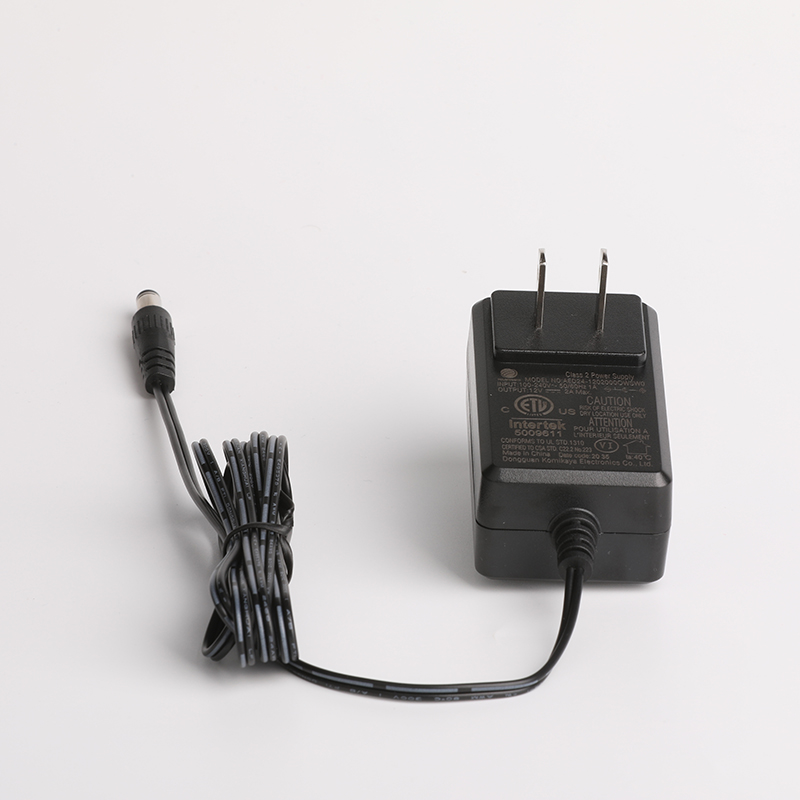
Pirmkārt, sāksim ar pamatiem. An Maiņstrāvas līdzstrāvas adapteris, pazīstams arī kā a strāvas adapteris, pārvērš maiņstrāvu (AC) no sienas kontaktligzdas līdzstrāvai (DC) ko var izmantot jūsu klēpjdators. Portatīvie datori darbojas ar līdzstrāvu, kamēr standarta elektrības kontaktligzdas nodrošina maiņstrāvu. The Maiņstrāvas līdzstrāvas adapteris darbojas kā starpnieks, nodrošinot, ka jūsu klēpjdators saņem pareizo strāvu, lai darbotos efektīvi un droši.

Maiņstrāvas līdzstrāvas adaptera galvenās sastāvdaļas
Turklāt, tipisks klēpjdators Maiņstrāvas līdzstrāvas adapteris sastāv no vairākām būtiskām sastāvdaļām:
- Barošanas vads: Šī daļa tiek pievienota sienas kontaktligzdai un nodrošina adaptera maiņstrāvu.
- Transformators: Šis komponents pārveido augstsprieguma maiņstrāvu no kontaktligzdas zemāka sprieguma līdzstrāvā, kas piemērota jūsu klēpjdatoram.
- Taisngriezis: Tas pārvērš maiņstrāvas spriegumu pulsējošā līdzstrāvas spriegumā.
- Filtrs: Tas izlīdzina pulsējošo līdzstrāvas spriegumu, nodrošinot stabilu un tīru barošanas avotu.
- Savienotājs: Šī daļa tiek pievienota jūsu klēpjdatoram, piegādājot pārveidoto līdzstrāvu.
Kāpēc maiņstrāvas līdzstrāvas adapteris ir svarīgs jūsu klēpjdatoram??
Turklāt, an Maiņstrāvas līdzstrāvas adapteris ir vairāk nekā tikai uzlādes ierīce; tam ir izšķiroša nozīme jūsu klēpjdatora vispārējā veiktspējā un ilgmūžībā. Šeit ir daži iemesli, kāpēc:
Stabils barošanas avots
An Maiņstrāvas līdzstrāvas adapteris nodrošina stabilu un konsekventu barošanas avotu jūsu klēpjdatoram. Tas nodrošina ierīce darbojas nevainojami, bez pēkšņām izslēgšanām vai veiktspējas problēmām. Stabils barošanas avots arī palīdz pagarināt jūsu klēpjdatora akumulatora darbības laiku.
Sprieguma regulēšana
Maiņstrāvas līdzstrāvas adapteri regulējiet spriegumu, lai nodrošinātu, ka tas paliek jūsu klēpjdatora drošā darbības diapazonā. Tas ir svarīgi jo sprieguma svārstības var sabojāt ierīci. Pārveidojot maiņstrāvu no sienas kontaktligzdas (parasti 100-240 V, 50-60Hz) zemākā, stabils līdzstrāvas spriegums (piemēram, 12V), adapteris aizsargā jūsu klēpjdatoru no iespējamām elektriskām problēmām.
Pārnesamība un ērtības
Turklāt, klēpjdators Maiņstrāvas līdzstrāvas adapteri ir paredzēti pārnēsājamiem, ļaujot izmantot ierīci jebkur, kur ir strāvas kontaktligzda. Neatkarīgi no tā, vai esat mājās, birojā, vai ceļojot, uzticams Maiņstrāvas līdzstrāvas adapteris nodrošina, ka jūsu klēpjdators paliek uzlādēts un gatavs lietošanai.
Portatīvo datoru barošanas adapteru veidi: Maiņstrāvas līdzstrāvas adapteris 100-240V 50-60Hz
Tagad, apskatīsim dažādus pieejamos strāvas adapteru veidus, katrs izstrādāts, lai atbilstu īpašām prasībām. Izpratne par šiem veidiem var palīdzēt izvēlēties pareizo adapteri jūsu klēpjdatoram.
Maiņstrāvas līdzstrāvas adapteris 100-240V 50-60Hz: Universāla saderība
Šāda veida Maiņstrāvas līdzstrāvas adapteris 100-240V 50-60Hz darbojas ar plašu sprieguma ieeju klāstu (100-240V) un frekvences (50-60Hz). Tas padara to ļoti daudzpusīgu un piemērots lietošanai dažādās valstīs ar atšķirīgiem elektriskajiem standartiem. Tas pārveido maiņstrāvu no sienas kontaktligzdas par stabilu līdzstrāvas barošanas avotu, nodrošinot jūsu klēpjdatora efektīvu darbību.
Maiņstrāvas līdzstrāvas adapteris 12V: Specifiskā sprieguma izvade
An Maiņstrāvas līdzstrāvas adapteris 12V ar 12 V izvadi ir īpaši izstrādāts, lai nodrošinātu pareizo jaudu jūsu klēpjdatoram. Šāda veida adapteris nodrošina jūsu klēpjdators saņem stabilu un konsekventu 12V līdzstrāvas barošanas avots, pasargājot to no sprieguma svārstībām un iespējamiem bojājumiem.
DC adapteris: Līdzstrāvas padeve
A Līdzstrāvas adapteris tieši piegādā līdzstrāvu jūsu klēpjdatoram. To bieži izmanto situācijās, kad ir pieejams tiešs līdzstrāvas avots, piemēram, automašīnā vai caur saules bateriju. Līdzstrāvas adapteri ir izstrādāti tā, lai tie būtu ļoti efektīvi un nodrošinātu stabilu barošanas avotu, nodrošinot jūsu klēpjdatora nevainojamu darbību.
Komutācijas adapteris 100-240V 50-60Hz: Efektīva enerģijas pārveidošana
A komutācijas adapteris 100-240V 50-60Hz izmanto komutācijas barošanas avotu, lai pārveidotu maiņstrāvu par līdzstrāvu. Šāda veida adapteris ir ļoti efektīvs un var apstrādāt plašu sprieguma ievades diapazonu (100-240V) un frekvences (50-60Hz). Tas nodrošina stabilu un konsekventu barošanas avotu, padarot to piemērotu dažādām elektroniskām ierīcēm, ieskaitot klēpjdatorus.
Maiņstrāvas adapteris 12V: Stabila strāvas padeve
An Maiņstrāvas adapteris 12V ar 12 V izeju ir paredzēts, lai nodrošinātu pareizo klēpjdatora jaudas daudzumu. Tas nodrošina jūsu klēpjdators saņem stabilu un konsekventu 12 V līdzstrāvas barošanas avotu, pasargājot to no sprieguma svārstībām un iespējamiem bojājumiem.
Pārslēdziet maiņstrāvas adapteri: Daudzpusīgi enerģijas risinājumi
A slēdzis maiņstrāvas adapteri ir daudzpusīgs strāvas adapteris, kas var pārslēgties starp dažādām sprieguma ieejām un izvadēm. Šāda veida adapteris ir ļoti efektīvs un var apstrādāt plašu sprieguma ievades diapazonu (100-240V) un frekvences (50-60Hz). Tas nodrošina stabilu un konsekventu barošanas avotu, padarot to piemērotu dažādām elektroniskām ierīcēm, ieskaitot klēpjdatorus.
Faktori, kas jāņem vērā, izvēloties maiņstrāvas līdzstrāvas adapteri
Izvēloties maiņstrāvas līdzstrāvas adapteri, vairāki faktori ir svarīgi, lai nodrošinātu, ka tas atbilst jūsu vajadzībām un nodrošina jūsu klēpjdatora drošību. Šeit ir daži galvenie apsvērumi:
Saderība: Adaptera saskaņošana ar ierīci
Pirmkārt un galvenokārt, nodrošināt Maiņstrāvas līdzstrāvas adapteris ir saderīgs ar jūsu klēpjdatoru. Pārbaudiet ierīces specifikācijas, lai noteiktu nepieciešamo spriegumu, pašreizējo, un savienotāja veids. Nesaderīga adaptera izmantošana var sabojāt klēpjdatoru vai novērst tā pareizu darbību.
Kvalitāte un uzticamība: Ieguldījums uzticamā maiņstrāvas līdzstrāvas adapterī
Turklāt, investēt augstā kvalitātē Maiņstrāvas līdzstrāvas adapteris no cienījama ražotāja. Labas kvalitātes adapterim būs labāka sprieguma regulēšana, energoefektivitāte, un drošības funkcijas. Tas būs arī izturīgāks un uzticamāks, nodrošinot, ka jūsu klēpjdators paliek darbināms un aizsargāts.
Drošības līdzekļi: Klēpjdatora aizsardzība pret elektrības problēmām
Turklāt, meklēt Maiņstrāvas līdzstrāvas adapteri ar iebūvētām drošības funkcijām, piemēram, aizsardzību pret pārspriegumu, īssavienojuma aizsardzība, un termiskā aizsardzība. Šīs funkcijas palīdz aizsargāt jūsu klēpjdatoru no iespējamiem bojājumiem, ko izraisa elektrības problēmas, un nodrošina adaptera drošu darbību.
Energoefektivitāte: Enerģijas taupīšana un ietekmes uz vidi samazināšana
Visbeidzot, izvēlēties energoefektīvu Maiņstrāvas līdzstrāvas adapteris. Energoefektīvi adapteri patērē mazāk enerģijas, kad tos neizmanto, samazinot enerģijas patēriņu un elektrības rēķinus. Tie ir arī labāki videi, palīdzot samazināt enerģijas izšķērdēšanu un oglekļa emisijas.
Kā izvēlēties pareizo maiņstrāvas līdzstrāvas adapteri savam klēpjdatoram
Lai izvēlētos pareizo maiņstrāvas līdzstrāvas adapteri, jums jāņem vērā vairāki faktori. Šeit ir norādītas dažas darbības, kas palīdzēs jums pieņemt apzinātu lēmumu:
Pārbaudiet sava klēpjdatora specifikācijas: Saderības nodrošināšana
Pirmais solis izvēloties an Maiņstrāvas līdzstrāvas adapteris ir pārbaudīt sava klēpjdatora specifikācijas. Meklējiet nepieciešamo spriegumu, pašreizējo, un savienotāja veids. Šī informācija parasti ir atrodama lietotāja rokasgrāmatā vai ražotāja vietnē. Saderības nodrošināšana ir ļoti svarīga, lai nesabojātu ierīci.
Apsveriet savas vajadzības: Ceļojumiem draudzīgas un daudzpusīgas iespējas
Tālāk, izvēloties savas īpašās vajadzības Maiņstrāvas līdzstrāvas adapteris. Piemēram, ja jūs bieži ceļojat, iespējams, vēlēsities adapteri, kas var apstrādāt plašu sprieguma ievades diapazonu (100-240V) un frekvences (50-60Hz). Tas nodrošinās jūsu klēpjdatora uzlādi neatkarīgi no tā, kurā pasaules malā atrodaties.
Meklējiet drošības sertifikātus: Kvalitātes un drošības nodrošināšana
Turklāt, izvēloties an Maiņstrāvas līdzstrāvas adapteris, meklējiet drošības sertifikātus, piemēram, UL, CE, vai RoHS. Šie sertifikāti norāda, ka adapteris ir pārbaudīts un atbilst noteiktiem drošības standartiem. Tas ir īpaši svarīgi, ja vēlaties nodrošināt ierīces aizsardzību pret iespējamām elektriskām problēmām.
Lasiet atsauksmes un vērtējumus: Apzināta lēmuma pieņemšana
Pirms pirkuma veikšanas, lasīt atsauksmes un vērtējumus no citiem lietotājiem. Tas var sniegt jums vērtīgu ieskatu par adaptera veiktspēju un uzticamību. Meklējiet atsauksmes, kurās ir minēta adaptera saderība, uzbūves kvalitāte, un drošības funkcijas.
Apsveriet zīmolu: Cienījamas un uzticamas iespējas
Visbeidzot, izvēloties an Maiņstrāvas līdzstrāvas adapteris no cienījama zīmola var sniegt jums sirdsmieru. Labi pazīstami zīmoli bieži piedāvā labāku kvalitāti, uzticamība, un klientu atbalsts. Turklāt, tie, visticamāk, sniegs garantijas un garantijas, nodrošinot uzticamu produktu.
Bieži sastopamās problēmas ar strāvas adapteriem un to novēršana
Pat labākie strāvas adapteri laiku pa laikam var rasties problēmas. Šeit ir dažas izplatītas problēmas un to novēršana:
Adapteris neuzlādējas: Savienojumu un saderības pārbaude
Ja jūsu klēpjdators netiek uzlādēts, vispirms pārbaudiet strāvas adapteri. Nodrošināt adapteris ir pareizi pievienots sienas kontaktligzdai un klēpjdatoram. Ja problēma joprojām pastāv, mēģiniet izmantot citu kontaktligzdu vai citu adapteri, lai noskaidrotu, vai problēma nav saistīta ar pašu adapteri.
Adaptera pārkaršana: Iespējamo problēmu identificēšana un risināšana
Ja strāvas adapteris pārkarst, tā varētu būt problēmas pazīme. Var izraisīt pārkaršanu ar bojātu adapteri, nesaderīga ierīce, vai elektrības problēma. Lai novērstu problēmas, atvienojiet adapteri un ļaujiet tam atdzist. Ja problēma turpinās, apsveriet iespēju nomainīt adapteri ar augstas kvalitātes adapteri, saderīgs.
Adapteris nav atpazīts: Saderības un iestatījumu pārbaude
Ja jūsu klēpjdators neatpazīst strāvas adapteri, tas varētu būt saistīts ar saderības problēmu vai bojātu adapteri. Pārbaudiet klēpjdatora specifikācijas, lai nodrošinātu adaptera saderību. Ja problēma joprojām pastāv, mēģiniet atiestatīt klēpjdatoru vai atjaunināt enerģijas pārvaldības iestatījumus.
Secinājums: Klēpjdatoram piemērota maiņstrāvas līdzstrāvas adaptera izvēle
Nobeigumā, an Maiņstrāvas līdzstrāvas adapteris ir būtiska jūsu klēpjdatora sastāvdaļa, nodrošinot stabilu un konsekventu barošanas avotu. Izpratne par dažādiem veidiem Maiņstrāvas līdzstrāvas adapteri un tas, kā izvēlēties pareizo, var palīdzēt nodrošināt, ka jūsu klēpjdators darbojas efektīvi un droši. Apsverot tādus faktorus kā saderība, kvalitāti, drošības funkcijas, un energoefektivitāti, varat pieņemt apzinātu lēmumu un izvēlēties Maiņstrāvas līdzstrāvas adapteris kas atbilst jūsu vajadzībām. Galu galā, vai esat mājās, darbā, vai ceļojot, uzticams Maiņstrāvas līdzstrāvas adapteris uztur jūsu klēpjdatoru uzlādētu un gatavu lietošanai, ļaujot jums palikt savienotiem un produktīviem mūsdienu digitālajā pasaulē.