
오늘날의 빠르게 변화하는 기술 중심의 세계에서, 전자 기기는 우리 일상 생활의 필수적인 부분이 되었습니다. 스마트폰, 태블릿부터 노트북, 게임 콘솔까지, 우리는 연결을 유지하기 위해 이러한 장치에 의존합니다., 즐겁게, 그리고 생산적이다. 하지만, 많은 사용자가 직면하는 일반적인 과제 중 하나는 이러한 장치에 효율적이고 안전하게 전원을 공급하는 방법입니다.. 범용 AC 어댑터가 작동하는 곳입니다.. 이 종합 가이드에서는, 범용 AC 어댑터 사용에 대해 자세히 살펴보겠습니다., 기능 이해부터 일반적인 문제 해결까지 모든 것을 다룹니다.. 이 글이 끝날 무렵, AC 어댑터를 효과적이고 안전하게 사용하는 방법을 철저하게 이해하게 됩니다..
AC 어댑터의 기본 이해
범용 AC 어댑터 사용에 대해 자세히 알아보기 전에, AC 어댑터의 기본 개념을 이해하는 것이 중요합니다.. AC 어댑터, 전원 공급 장치 또는 충전기라고도 함, 교류를 변환하는 장치이다. (교류) 벽면 콘센트에서 직류로 (DC) 전자 장치에 전원을 공급하는 데 사용할 수 있는 것. 대부분의 전자 장치는 DC 전원으로 작동하기 때문에 이 변환은 매우 중요합니다., 벽면 콘센트에서 공급되는 전기는 AC 형태입니다..
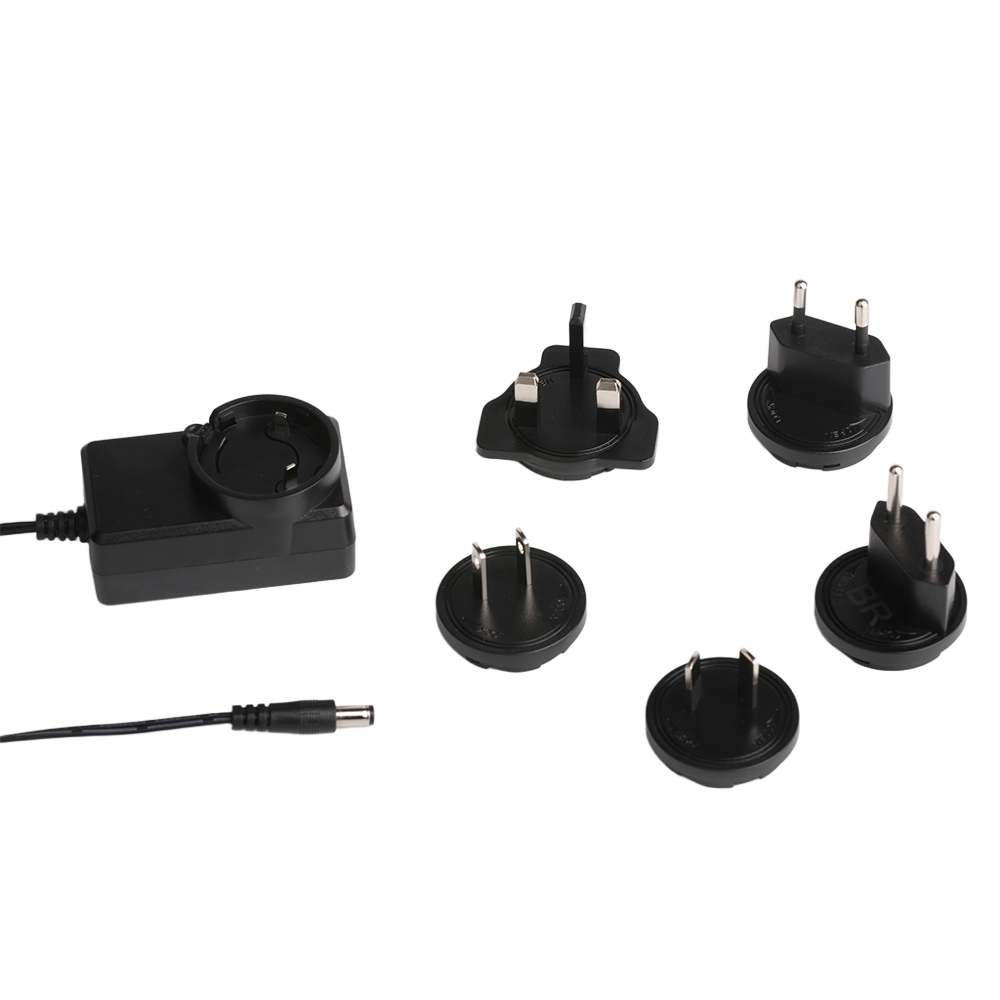
AC 어댑터의 주요 구성 요소
- 입력 전압 범위: 입력 전압 범위는 어댑터가 벽면 콘센트에서 수용할 수 있는 전압 범위를 나타냅니다.. 범용 AC 어댑터는 일반적으로 입력 범위가 넓습니다., 100V~240V 등, 다양한 전압 표준을 사용하는 여러 국가에서 사용하기에 적합하도록 만듭니다..
- 출력 전압 및 전류: 출력 전압과 전류는 장치와 어댑터의 호환성을 결정하는 중요한 사양입니다.. 예를 들어, 노트북에는 12V-240V 어댑터 올바르게 작동하려면 특정 전류 등급이 있어야 합니다..
- 전원 코드: 그만큼 AC 어댑터 전원 코드 어댑터와 벽면 콘센트 사이의 물리적 연결입니다.. 어댑터가 효율적으로 작동하려면 전원 코드의 상태가 양호하고 제대로 연결되어 있는지 확인하는 것이 중요합니다..
AC 어댑터 사용 방법: 단계별 가이드
AC 어댑터 사용은 간단해 보일 수 있습니다., 하지만 안전하고 효율적인 작동을 보장하기 위해서는 몇 가지 단계와 고려 사항이 있습니다.. 범용 AC 어댑터를 최대한 활용하려면 다음 단계를 따르세요.:
단계 1: 장치의 전원 요구 사항 식별
AC 어댑터를 장치에 연결하기 전에, 장치의 특정 전력 요구 사항을 이해하는 것이 중요합니다.. 이 정보는 일반적으로 장치의 사용 설명서나 장치 자체에서 찾을 수 있습니다.. Look for the required input voltage (예를 들어, 12다섯) 그리고 현재 (예를 들어, 2에이). Matching these specifications with the adapter’s output is essential to avoid damaging your device.
단계 2: Choose the Right AC Adapter
Universal AC adapters are designed to be versatile and compatible with a wide range of devices. 하지만, it is still important to select an adapter that meets the specific power requirements of your device. When choosing an AC adapter, pay close attention to the following:
- Voltage Compatibility: Ensure that the adapter’s output voltage matches the device’s required voltage. 예를 들어, if your device requires a 6V adapter, do not use an adapter with a higher or lower voltage.
- Current Capability: The adapter’s output current should be equal to or higher than the device’s required current. Using an adapter with insufficient current capacity can lead to poor performance or even damage to the device.
- 커넥터 유형: The physical connector of the adapter must match the input port of your device. Universal adapters often come with interchangeable tips to accommodate different connector types.
단계 3: Connect the AC Adapter
Once you have identified the correct adapter, it is time to connect it to your device and the power source. Follow these steps:
- Plug in the Power Cord: Insert the AC adapter power cord into a suitable wall outlet. Ensure that the outlet is in good working condition and provides the appropriate voltage for the adapter.
- Connect the Adapter to the Device: Attach the adapter’s output connector to the device’s power input port. 연결이 느슨해지지 않도록 연결이 확실하고 올바르게 정렬되었는지 확인하십시오..
- 장치 켜기: 어댑터를 연결한 후, 기기를 켜세요. 대부분의 장치는 자동으로 전원을 감지하고 충전 또는 작동을 시작합니다..
단계 4: 모니터링 및 유지
AC 어댑터 사용은 설정하고 잊어버리는 과정이 아닙니다.. 어댑터와 장치의 수명을 보장하려면 정기적인 모니터링과 유지 관리가 필수적입니다.. 올바른 사용을 위한 몇 가지 팁은 다음과 같습니다.:
- 과부하 방지: AC 어댑터와 동일한 콘센트나 전원 스트립에 여러 개의 고전력 장치를 연결하지 마십시오.. 과부하로 인해 전압 변동이 발생하고 어댑터 및 연결된 장치가 손상될 수 있습니다..
- 시원하게 유지하세요: 어댑터가 적절하게 환기되는지 확인하고 제한되거나 과열된 장소에 두지 마십시오.. Excessive heat can reduce the adapter’s efficiency and lifespan.
- Inspect for Damage: Regularly check the power cord and adapter for any signs of wear, fraying, or damage. If you notice any issues, replace the adapter immediately to avoid electrical hazards.
Troubleshooting Common Issues
신뢰성에도 불구하고, AC adapters can sometimes encounter issues. Here are some common problems and their solutions:
Issue 1: Device Not Charging
If your device is not charging, there could be several reasons:
- Check Connections: Ensure that the power cord is securely plugged into the outlet and the adapter is properly connected to the device.
- Verify Voltage Compatibility: Double-check that the adapter’s output voltage matches the device’s requirements. Using an incompatible adapter can prevent charging.
- Test the Outlet: Use another device to verify that the wall outlet is functioning correctly. If the outlet is not working, try a different one.
Issue 2: 어댑터 과열
Overheating can be a sign of a problem with the adapter or its usage:
- Reduce Load: If you are using the adapter to power multiple devices, disconnect some of them to reduce the load.
- Improve Ventilation: Ensure that the adapter is not obstructed and has proper airflow. Move it to a cooler location if necessary.
- Replace the Adapter: If the overheating persists, it may be a sign of a faulty adapter. Replace it with a new one to avoid potential damage to your devices.
Issue 3: Inconsistent Power Supply
If your device experiences intermittent power or frequent shutdowns, consider the following:
- Check for Loose Connections: Inspect the power cord and connectors for any signs of looseness or damage.
- Use a Surge Protector: Power surges can disrupt the power supply. Using a surge protector can help stabilize the voltage and protect your devices.
- Upgrade the Adapter: If the issue persists, it may be due to an insufficient or low-quality adapter. Consider upgrading to a higher-quality universal AC adapter.

Safety Tips for Using AC Adapters
Safety should always be a top priority when using electrical devices. Here are some essential safety tips for using AC adapters:
- Avoid Overloading Outlets: 하나의 콘센트나 멀티탭에 너무 많은 장치를 연결하지 마십시오.. Overloading can cause electrical fires and damage to your devices.
- Use Certified Adapters: Always choose adapters that are certified by recognized safety standards organizations. Certified adapters undergo rigorous testing to ensure they meet safety and performance requirements.
- Unplug When Not in Use: Disconnect the AC adapter from the power source when it is not in use. This not only saves energy but also reduces the risk of electrical hazards.
- Keep Away from Water: Ensure that the adapter and power cord are kept away from water sources. Water and electricity do not mix, and exposure to moisture can lead to electrical shocks and damage.
결론
A universal AC adapter is a versatile and essential tool for powering a wide range of electronic devices. By understanding its functions, following proper usage guidelines, and practicing safety, you can ensure that your devices receive a reliable and efficient power supply. Whether you need a 12V to 240V adapter for your laptop or a 6V adapter for a small electronic device, knowing how to use an AC adapter correctly will help you get the most out of your gadgets while minimizing the risk of damage or electrical hazards.
In today’s interconnected world, having a reliable power solution is crucial. With the right knowledge and tools, you can confidently use a universal AC adapter to keep your devices powered up and ready to go. So, the next time you reach for your AC adapter, remember the tips and insights shared in this guide to make the most of this indispensable piece of technology.