
In today’s fast-paced and technology-driven world, electronic devices have become an integral part of our daily lives. From smartphones and tablets to laptops and gaming consoles, we rely on these gadgets to stay connected, entertained, and productive. Siiski, one common challenge that many users face is how to power these devices efficiently and safely. This is where the universal AC adapter comes into play. In this comprehensive guide, we will explore the ins and outs of using a universal AC adapter, covering everything from understanding its functions to troubleshooting common issues. By the end of this article, you will have a thorough understanding of how to use an AC adapter effectively and safely.
Vahelduvvooluadapterite põhitõdede mõistmine
Before diving into the specifics of using a universal AC adapter, it is essential to grasp the fundamental concepts behind AC adapters. Vahelduvvoolu adapter, also known as a power supply or charger, on seade, mis muundab vahelduvvoolu (AC) seinakontaktist alalisvoolu (DC) that can be used to power electronic devices. This conversion is crucial because most electronic devices operate on DC power, while the electricity supplied by wall outlets is in the form of AC.
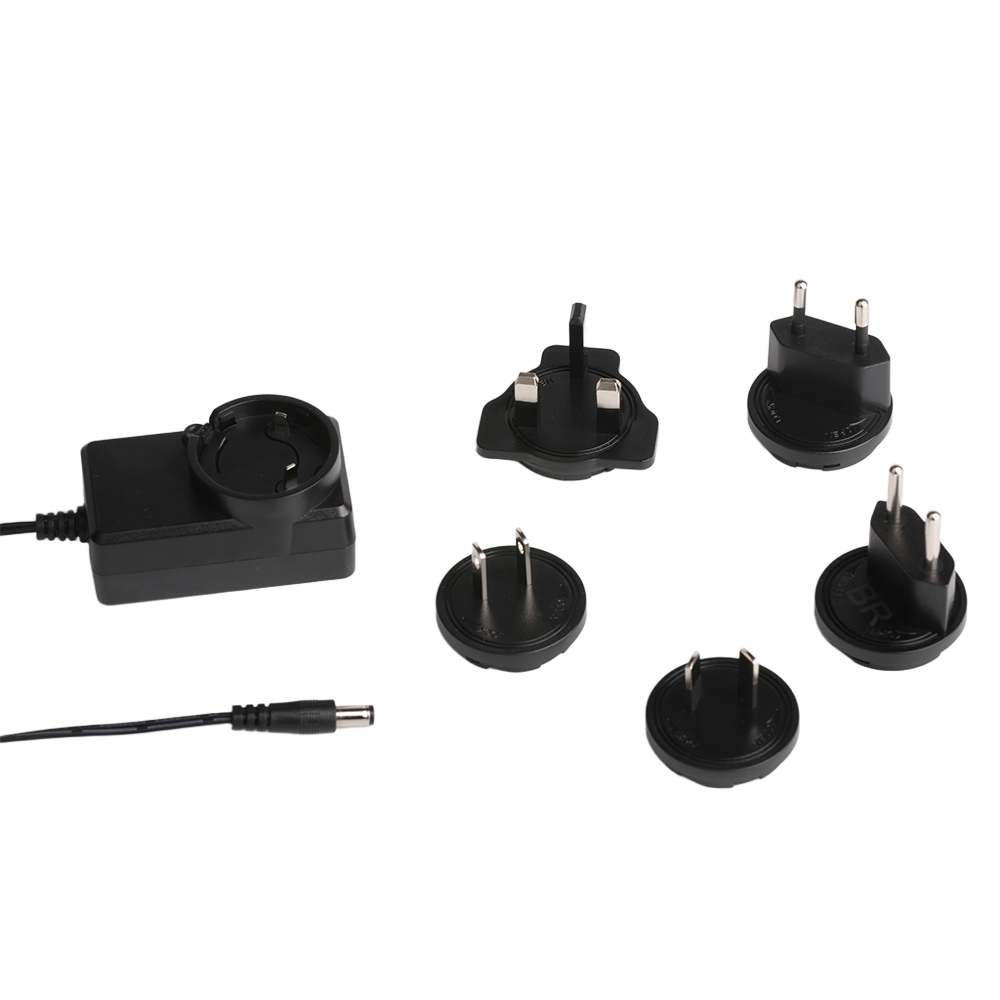
Vahelduvvooluadapteri põhikomponendid
- Input Voltage Range: The input voltage range indicates the range of voltages that the adapter can accept from the wall outlet. Universal AC adapters typically have a wide input range, such as 100V to 240V, making them suitable for use in different countries with varying voltage standards.
- Output Voltage and Current: The output voltage and current are critical specifications that determine the compatibility of the adapter with your device. Näiteks, a laptop might require a 12V to 240V adapter with a specific current rating to function correctly.
- Power Cord: The AC adapter power cord is the physical connection between the adapter and the wall outlet. It is essential to ensure that the power cord is in good condition and properly plugged in for the adapter to work efficiently.
Kuidas kasutada vahelduvvoolu adapterit: Step-by-Step Guide
Using an AC adapter may seem straightforward, but there are several steps and considerations to ensure safe and efficient operation. Follow these steps to get the most out of your universal AC adapter:
Step 1: Identify the Device’s Power Requirements
Before connecting any AC adapter to your device, it is crucial to understand the specific power requirements of the device. This information can usually be found in the device’s user manual or on the device itself. Otsige vajalikku sisendpinget (nt., 12V) ja praegune (nt., 2A). Seadme kahjustamise vältimiseks on nende spetsifikatsioonide sobitamine adapteri väljundiga hädavajalik.
Step 2: Valige õige vahelduvvooluadapter
Universaalsed vahelduvvooluadapterid on loodud olema mitmekülgsed ja ühilduvad paljude seadmetega. Siiski, siiski on oluline valida adapter, mis vastab teie seadme konkreetsetele toitenõuetele. Vahelduvvooluadapteri valimisel, pöörake suurt tähelepanu järgmisele:
- Pinge ühilduvus: Veenduge, et adapteri väljundpinge vastaks seadme nõutavale pingele. Näiteks, kui teie seade vajab 6 V adapterit, ärge kasutage kõrgema või madalama pingega adapterit.
- Praegune võime: Adapteri väljundvool peaks olema võrdne seadme nõutava vooluga või sellest suurem. Using an adapter with insufficient current capacity can lead to poor performance or even damage to the device.
- Ühenduse tüüp: The physical connector of the adapter must match the input port of your device. Universal adapters often come with interchangeable tips to accommodate different connector types.
Step 3: Connect the AC Adapter
Once you have identified the correct adapter, it is time to connect it to your device and the power source. Follow these steps:
- Plug in the Power Cord: Insert the AC adapter power cord into a suitable wall outlet. Ensure that the outlet is in good working condition and provides the appropriate voltage for the adapter.
- Connect the Adapter to the Device: Attach the adapter’s output connector to the device’s power input port. Make sure the connection is secure and properly aligned to avoid any loose connections.
- Turn on the Device: After connecting the adapter, turn on your device. Most devices will automatically detect the power source and begin charging or operating.
Step 4: Monitor and Maintain
Using an AC adapter is not a set-it-and-forget-it process. Regular monitoring and maintenance are essential to ensure the longevity of both the adapter and your device. Here are some tips for proper usage:
- Avoid Overloading: Do not plug multiple high-power devices into the same outlet or power strip as your AC adapter. Overloading can cause voltage fluctuations and potentially damage the adapter and connected devices.
- Keep It Cool: Ensure that the adapter has adequate ventilation and is not placed in a confined or overheated area. Liigne kuumus võib vähendada adapteri tõhusust ja eluiga.
- Kontrollige kahjustusi: Kontrollige regulaarselt toitejuhet ja adapterit kulumismärkide suhtes, narmendav, või kahju. Kui märkate probleeme, elektriohu vältimiseks vahetage adapter kohe välja.
Levinud probleemide tõrkeotsing
Vaatamata nende usaldusväärsusele, Vahelduvvooluadapteritel võib mõnikord probleeme tekkida. Siin on mõned levinumad probleemid ja nende lahendused:
probleem 1: Seade ei lae
Kui teie seade ei lae, põhjuseid võib olla mitu:
- Kontrollige Ühendused: Veenduge, et toitejuhe on korralikult pistikupessa ühendatud ja adapter on seadmega korralikult ühendatud.
- Kontrollige pinge ühilduvust: Kontrollige veelkord, et adapteri väljundpinge vastaks seadme nõuetele. Ühildumatu adapteri kasutamine võib laadimist takistada.
- Testige väljalaskeava: Kasutage mõnda muud seadet, et kontrollida, kas seinakontakt korralikult töötab. Kui väljalaskeava ei tööta, proovi teistsugust.
probleem 2: Adapteri ülekuumenemine
Ülekuumenemine võib olla märk adapteri või selle kasutamise probleemist:
- Vähenda koormust: Kui kasutate adapterit mitme seadme toiteks, koormuse vähendamiseks ühendage mõned neist lahti.
- Parandage ventilatsiooni: Veenduge, et adapter ei oleks takistatud ja et õhuvool oleks korralik. Vajadusel viige see jahedamasse kohta.
- Vahetage adapter välja: Kui ülekuumenemine püsib, see võib olla märk vigasest adapterist. Seadme võimaliku kahjustamise vältimiseks asendage see uuega.
probleem 3: Ebaühtlane toiteallikas
Kui teie seade kogeb vahelduvat toidet või sagedasi väljalülitusi, kaaluge järgmist:
- Kontrollige lahtiste ühenduste olemasolu: Kontrollige toitejuhet ja pistikuid lahtiste või kahjustuste suhtes.
- Use a Surge Protector: Power surges can disrupt the power supply. Using a surge protector can help stabilize the voltage and protect your devices.
- Upgrade the Adapter: If the issue persists, it may be due to an insufficient or low-quality adapter. Consider upgrading to a higher-quality universal AC adapter.

Safety Tips for Using AC Adapters
Safety should always be a top priority when using electrical devices. Here are some essential safety tips for using AC adapters:
- Avoid Overloading Outlets: Ärge ühendage liiga palju seadmeid ühte pistikupessa või pistikupessa. Overloading can cause electrical fires and damage to your devices.
- Use Certified Adapters: Always choose adapters that are certified by recognized safety standards organizations. Certified adapters undergo rigorous testing to ensure they meet safety and performance requirements.
- Unplug When Not in Use: Disconnect the AC adapter from the power source when it is not in use. This not only saves energy but also reduces the risk of electrical hazards.
- Keep Away from Water: Ensure that the adapter and power cord are kept away from water sources. Water and electricity do not mix, and exposure to moisture can lead to electrical shocks and damage.
Järeldus
A universal AC adapter is a versatile and essential tool for powering a wide range of electronic devices. By understanding its functions, following proper usage guidelines, and practicing safety, you can ensure that your devices receive a reliable and efficient power supply. Whether you need a 12V to 240V adapter for your laptop or a 6V adapter for a small electronic device, knowing how to use an AC adapter correctly will help you get the most out of your gadgets while minimizing the risk of damage or electrical hazards.
In today’s interconnected world, having a reliable power solution is crucial. With the right knowledge and tools, you can confidently use a universal AC adapter to keep your devices powered up and ready to go. So, the next time you reach for your AC adapter, remember the tips and insights shared in this guide to make the most of this indispensable piece of technology.